Maya's Blog
I made the Envision Logo (somewhat)
Background
First, let me tell you what Envision is. Envision is a linux application that makes setting up XR applications approachable to the average user. Users can simply select a preset, compile the preset (which compiles the latest version of the OpenXR runtime Monado and any selected additional packages, like the OpenVR to OpenXR converter Opencomposite) after which simply hitting “start” starts everything up, allowing XR applications like Beat Saber or Blender to use the XR headset. Users can also modify presets to use their own environment variables, git repos and branches and choose additional software to use like Mercury hand tracking, making Envision also suitable for advanced users.
The old application icon
Like many applications, Envision is a GTK4 application making it feel right at home alongside other GTK applications on the Gnome desktop. This means that Envision tries to adhere to the Gnome Human Interface Guidelines, basically documentation specifying how your application should look, how it should work, and how users should interact with your application. As a part of those guidelines, a specification for how the application icon should look is given. In essence, the Gnome HIG says that your application icon should:
- Not use an extreme aspect ratio.
- Resemble a real-life object that represents the application.
- Generally use flat colours for flat surfaces and gradients for curves.
- Have an Orthographic perspective looking down at the icon at around a 45° angle.
While the old Envision application icon does adhere to a few of these requirements, it uses flat colors for some of the curved surfaces, the facial interface is a bit difficult to identify, especially if the user has never seen that style of headset before, and the icon is viewed from 45° above the icon, rather than below. Since I use many other Gnome applications, the Envision icon kinda looked out of place since it was not following the guidelines of my other applications. So, when Skull on the LVRA Discord suggested that I help with some graphic design for the Envision project after I showed some XR-related GTK icons I did for fun, I accepted the challenge and got to work.
Making of the new icon

The old envision logo created by GabMus that I was trying to improve
Since an old icon had already been made, I wanted to keep many core aspects of how the icon looks, especially considering how the new icon will replace the old one on user’s desktops when they update Envision. I particularly liked:
- The more modern headset design that’s more form-fitting, rather than the more brick shape of headsets like the Original HTC Vive, Oculus CV1 and DK1, and PSVR1.
- The rainbow gradient around the rim of the headset
However, I thought that the old icon was missing some parts that would make it easier for user’s to recognize as a VR headset like:
- A headstrap, since it makes up a large part of the headset.
- Some kind of light to show that the icon was an electronic device.
- Visible cameras since many modern headsets use cameras for Inside Out SLAM Tracking, for tracking controllers, for hand tracking, or just for visual passthough.
For my first iteration, I reasoned that since many people still use headsets like the Valve index and Original HTC Vive and the visual simplicity of brick-like headsets, I should make an icon that looks like one of these older brick-like headsets.
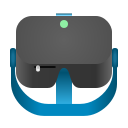
My first try at a headset that resembles an HTC Vive or Valve Index or CV1
I also created an icon styled after the Meta Quest 2 simply because of how well that headset has sold.

My second try at a headset that resembles the quest 2
However, this was quickly discarded by GabMus, Envision’s lead developer who said that the icon should look like the original logo which was supposed to be an imaginary, non existing headset.
I then created a new design that much more closely followed the original design created by GabMus, but followed the Gnome HIG a bit better. I first tried a version that shows the lenses of the VR headset, since I think that the lenses are a very recognizable part of vr headsets in general.

An experimental logo that looks at the headset’s lenses
However, after making the icon with this new perspective, I found that it didn’t look particularly recognizable compared to the front views, so I tried a new idea that follows GabMus’ original design even closer.

The logo I created before GabMus made their modifications
This is the design that ended up getting modified by GabMus to be shipped with Envision on countless people’s computers. I think the fact that I was a part of this process was pretty dang cool. Every time I see the envision logo used somewhere, I’m like “hey, I helped with that!”.

The final logo after GabMus’ modifications